



APIs have their own distinct error and threat scenarios. For example, they often do not store session states on the server but rely on parameters transmitted by the client (e.g., object IDs) to decide which data to access. This facilitates scaling but opens new opportunities up for attackers to exploit missing authorization.
A prime example of this is Broken Object Level Authorization (BOLA). Behind this unwieldy term lies an everyday risk: a lack of checks at the object level that allow logged-in attackers to access other people’s data by manipulating IDs. If a user accesses an object for which their rights are not checked (or don’t exist), a critical security vulnerability arises. It’s no wonder, then, that BOLA ranks number 1 in the “OWASP API Security Top 10” (Fig. 1).
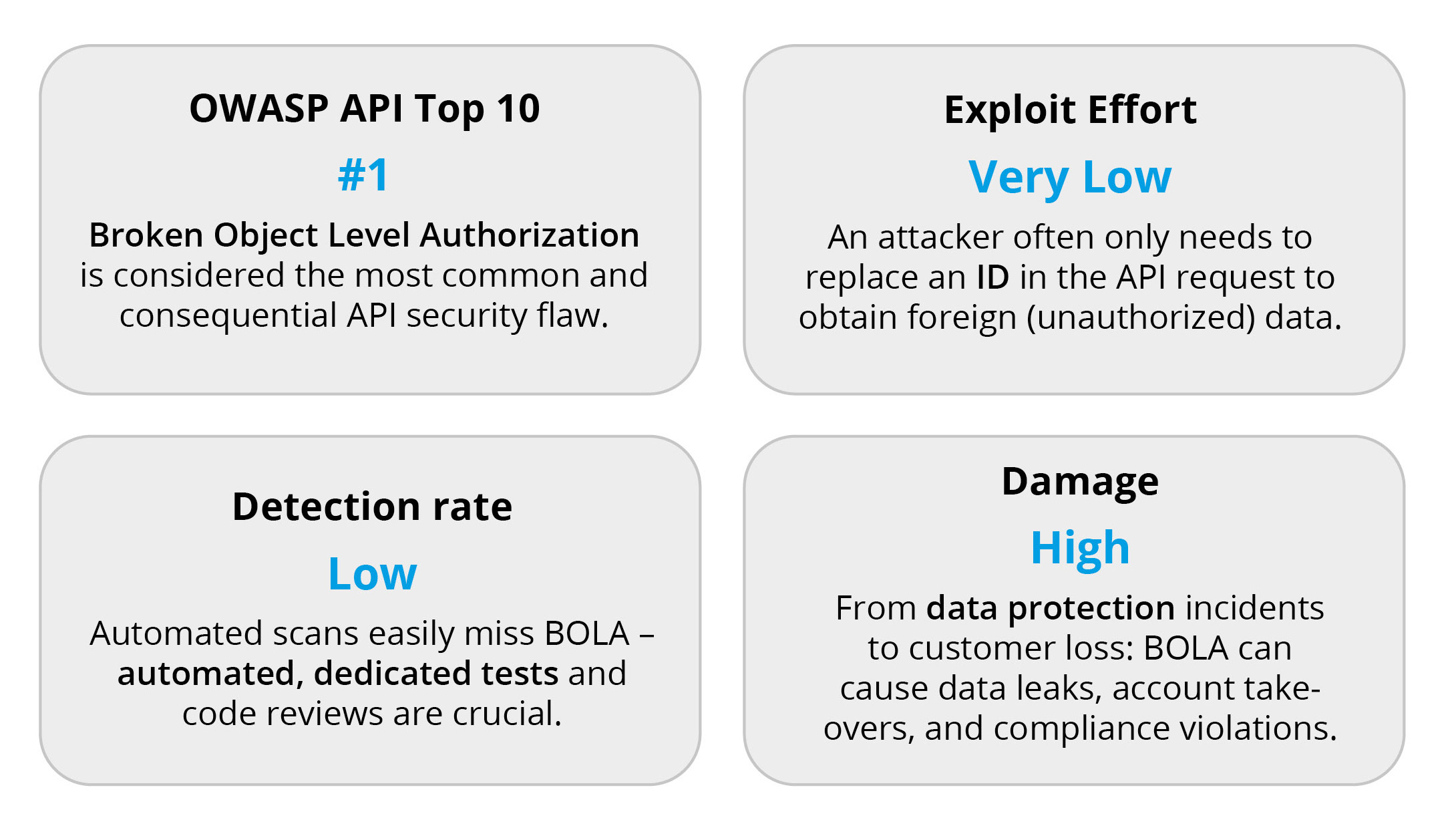
Fig. 1: BOLA risk in numbers – trivial to exploit, but potentially devastating
Due to the similarity, BOLA is often used as a modern name for the classic IDOR (Insecure Direct Object Reference). Strictly speaking, the difference lies primarily in the context: IDOR was mostly discussed in the context of traditional web applications, while BOLA specifically refers to authorization gaps in API-supported scenarios.
Without further ado, let’s take a practical look at how BOLA gaps arise, how they can be avoided in Java/Spring APIs, and which protection and detection strategies make sense for developers, architects, and CISOs.
STAY TUNED!
Learn more about API Conference
What is BOLA in concrete terms?
Let’s imagine the following scenario: A supermarket API provides endpoints for managing a customer’s shopping cart – adding items, removing items, etc. Each customer should only be able to edit their own shopping cart. However, a BOLA vulnerability means that this security measure is missing at the object level. The result: an authenticated user can view or manipulate other people’s shopping carts using simple ID tricks. Figuratively speaking, customer 1 accesses customer 2’s shopping cart by replacing their ID with that of customer 2 in the API call.
This attack requires neither special know-how nor special tools. If resource IDs are guessable or sequential (e.g., customer/1, customer/2, etc.), an attacker only needs to change them. If the API is not secured at the object level, the attacker gains unauthorized access. BOLA is ultimately old wine in new bottles – the well-known IDOR problem in modern APIs. The difference is that it occurs particularly frequently in APIs because clients transmit object references independently. Instead of being predominantly controlled on the server side, as in classic web apps.
Example 1: External shopping cart in the shop API
Let’s consider a shop API (for an online supermarket, for example) that is used by a web or mobile app. One endpoint allows items to be added to a customer’s shopping cart (Listing 1).
Listing 1
POST /api/customers/{customerId}/shopping-cart

{

  "productId": 4711,

  "quantity": 2

}
The error: If the backend blindly trusts the customerId from the URL, a logged-in user can manipulate their request. For example, user Customer 1 (ID=1) changes the URL to /api/customers/2/shopping-cart and adds an item. Without further verification, the API would now place the item in Customer 2’s shopping cart: an authorization gap!
This horizontal privilege escalation is a classic BOLA case. It occurs after authentication (the user is logged in) but without correct authorization at the object level. An analogous vertical attack (e.g., user accesses admin resources), on the other hand, it falls more under broken function level authorization and isn’t considered here.
Why does such a gap arise?
Bugs like this often arise from convenience or carelessness. The client is left to specify the object or user ID to save a seemingly superfluous step in the server code. In the example, an inexperienced developer might have implemented what is shown in Listing 2.
Listing 2
// Insecure implementation – no ownership check

@PostMapping("/api/customers/{id}/shopping-cart")

public ResponseEntity addItem(

  @PathVariable("id") Long customerId,

  @RequestBody item item,

  Authentication auth) {

    shoppingCartService.addItem(customerId, item);

    return ResponseEntity.ok().build();

}
STAY TUNED!
Learn more about API Conference
This method takes the customer ID directly from the path parameter, uses it unchecked in the service, and ignores the logged-in user (auth). If shoppingCartService.add does not check whether the current user belongs to customerId, this is a massive gap in security. And in practice, this check is often missing. Either because it was forgotten or because it was accidentally removed during refactoring/library updates. After all, it seems to work: the regular client always passes its own ID, and the error is not noticeable during normal operation. Only targeted tests (or an attacker) reveal that anyone can access anyone else’s shopping cart.
In traditional web applications, a central mechanism sometimes catches such errors (e.g., a servlet filter or MVC interceptor that checks paths for membership). With microservices APIs, however, the responsibility usually lies with the service itself. An API gateway can respond to path patterns, but in this case, it does not yet know which customer ID the requesting user should have. Therefore, object permissions must usually be checked within the service code, as close as possible to the database query or access to the object.
It becomes particularly challenging when multiple microservices must implement the same access policy – for example, for cross-domain resources. Keeping the logic consistent, for example via a shared library or policy definition, is technically demanding and prone to errors. Even small deviations or version differences can lead to inconsistent behavior and security gaps.
Solutions in the shop example
The following section presents sample solutions for our shop API example.
Ownership check in the code
The simplest fix is to validate the transferred ID against the logged-in user. In Java/Spring, for example, you pull the user ID from the security context (session or JWT) and compare it (Listing 3).
Listing 3
@PostMapping("/api/customers/{id}/shopping-cart")

public ResponseEntity addItem(

  @PathVariable("id") Long customerId,

  @RequestBody article article,

  Authentication auth) {

    Long currentCustomerId = AuthUtil.readUserId(auth);

    if (!customerId.equals(currentCustomerId)) {

      // Option A: 403 (clear, but reveals existence)

      // return ResponseEntity.status(HttpStatus.FORBIDDEN).build();

      // Option B: 404 (obscures whether the ID exists)

      return ResponseEntity.status(HttpStatus.NOT_FOUND).build();

    }

    shoppingCartService.add(customerId, item);

    return ResponseEntity.ok().build();

}
Here, before the shopping cart operation, a check is made to see whether the path ID matches the ID of the current user. If not, the operation is aborted with “404 Not Found.” This pattern follows the principle: “Never trust data sent by the client!” – whether in the URL path, query parameter, or request body, every ID coming from the client must be considered potentially manipulated. It’s crucial to base the server logic on which objects a user is allowed to own or edit.
Framework-supported authorization
Spring Security allows such checks to be resolved declaratively via annotation. For example, it can be specified that the method call is only allowed if the path ID matches the user ID in the token (Listing 4).
Listing 4
@PostMapping("/api/customers/{id}/shopping-cart")

@PreAuthorize("#id == authentication.principal.id")

public ResponseEntity addItem(

  @PathVariable("id") Long customerId,

  @RequestBody item item) {

    // ... add to shopping cart

}
The SpEL expression in @PreAuthorize checks at runtime whether the transferred ID (#id) is the same as the ID of the logged-in user (authentication.principal.id). If false, the method is not executed at all – Spring Security automatically returns “403”. The advantage is that the business code remains clean, and the security logic can be configured centrally. The prerequisite is that the principal has an id property (usually the case with your own user objects). Alternatively, you could use your own PermissionEvaluator or a service method, e.g., @PreAuthorize(“@userService.hasAccess(#id)”), which checks ownership internally.
Unguessable IDs as in-depth defense
An additional layer of protection is to make identifiers less guessable. In the shopping cart example, this means that instead of open, sequential customer IDs, each user could have a random shopping cart key, e.g., /api/shopping-carts/ASDF-XYZ-1234 instead of /api/customers/2/shopping-cart. Even if no check is accidentally performed on the owner, it is much more difficult for attackers to find valid foreign IDs. Important to note that this is only additional security, not a substitute for authorization checks. If an attacker does obtain a valid key (e.g., via leak or brute force), the random ID alone is useless. Nevertheless, unpredictable GUIDs or sufficiently long, random IDs make mass attacks considerably more difficult and are therefore best practice wherever possible.
Test carefully
Developers should write targeted tests to detect BOLA early on. This is best done in the form of automated integration tests: Test user A attempts to access data from user B (or vice versa) and must receive an error. Scenarios like this should be part of the test suite. In addition, in case of suspicious behavior or during regular audits, you can also manually check whether endpoints are vulnerable to ID tampering. Tools such as Postman or Burp Suite allow you to try identical requests with different IDs. Please note: Manual testing should only be used as a supplement; it is by no means a substitute for automated testing but is rather intended as a “stopgap” or for special penetration tests. It should be part of the team’s quality standards to ensure that a corresponding negative test exists for every endpoint with object IDs.
Conclusion from example 1: APIs must lock the doors on multiple levels. At the endpoint level, Spring Security, for example, uses roles/authorities to control whether a user is allowed to call a path at all. But at the object level, each request must additionally validate that user X is actually allowed to access object Y. If this control is missing, the “foreign shopping cart” is open – it’s a worst-case scenario for trust and security.
Example 2: Bank API – securing accounts with power of attorney
Now for a more complex scenario from the financial world: A banking API offers an endpoint /api/accounts/{accountNo} that customers can use to retrieve their account details. Here, too, only authorized people may access an account.
Let’s assume that the account numbers are entirely numerical and contain the customer ID in the last six digits. For example: account number 550000 123456, where the last six digits (123456) represent the customer number. A simple policy idea would be: “Only allow access if the customer ID in the JWT matches the last digits of the account number.” In other words, the account path /api/accounts/550000123456 may only be queried by customer 123456 themselves, and no one else. (Fig. 2)
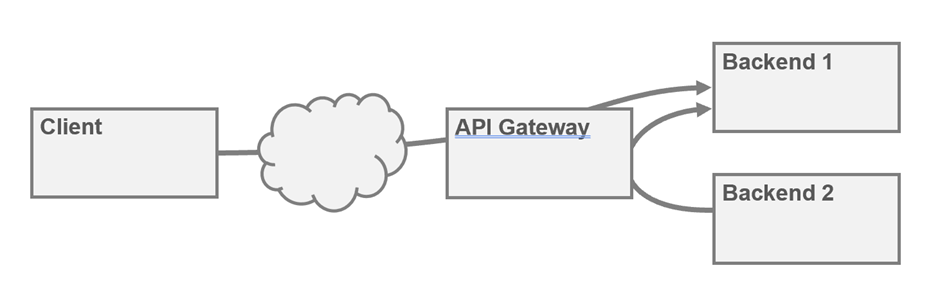
Fig. 2: Network policies only allow backend access via the API gateways.
STAY TUNED!
Learn more about API Conference
In Microsoft Azure, an API management policy could be implemented as shown in Listing 5.
Listing 5
<inbound>

  <base />


  <!-- Validate JWT -->

  <validate-jwt header-name="Authorization" failed-validation-httpcode="401" failed-validation-error-message="Invalid token.">

    <openid-config url="https://<your-idp>.well-known/openid-configuration" />

    <required-claims>

      <claim name="customerId" />

    </required-claims>

  </validate-jwt>


  <!-- Extract JWT claim 'customerId' -->

  <set-variable name="jwtCustomerId" value="@(context.Request.Headers.GetValueOrDefault("Authorization") != null ? ((Jwt)context.Request.Headers.GetValueOrDefault("Authorization")).Claims["customerId"] : null)" />


  <!-- Extract account number from query parameter -->

  <set-variable name="accountNumber" value="@(context.Request.Url.Query.GetValueOrDefault("accountNumber"))" />


  <!-- Extract last 6 digits of account number -->

  <set-variable name="accountSuffix" value="@(context.Variables.GetValueOrDefault<string>("accountNumber")?.Length >= 6 ? context.Variables.GetValueOrDefault<string>("accountNumber").Substring(context.Variables.GetValueOrDefault<string>("accountNumber").Length - 6) : null)" />


  <!-- Comparison: do the last 6 digits match the JWT claim? -->

  <choose>

    <when condition="@(context.Variables.GetValueOrDefault<string>("accountSuffix") != context.Variables.GetValueOrDefault<string>("jwtCustomerId"))">

      <return-response>

        <set-status code="403" reason="Access denied" />

          <set-header name="Content-Type" existsplication/json</value>

        </set-header>

        <set-body>{

          "error": "The customer number in the token does not match the account number."

        }</set-body>

      </return-response>

    </when>

  </choose>

</inbound>
In many cases, this works. But what if account authorizations come into play? In practice, customers often have authorized representatives (e.g., an assistant or family member) who also have access to the account. Let’s assume that customer A (ID 111111) has authorization for customer B’s account (ID 987654). B’s account number is approximately 770000 987654. According to the above policy, Customer A should not be able to access this account because their own ID (111111) does not match the last digits of the account number (987654). Rigid checking according to the scheme would therefore deny legitimate access.
In short, the postfix pattern “ID in the path must be equal to user ID” falls short when access rights are more complex.
Dynamic solution: JWT claims + gateway policy
Instead of using regex or naming conventions, authorization can be solved dynamically. This is where JSON Web Tokens (JWT) and API gateways come into play.
Upon login, each user receives a JWT that contains not only their user ID but also all accounts to which they have access as a claim. For customer A with power of attorney over B’s account, a decoded JWT might look something like the one shown in Listing 6.
Listing 6
{

  "sub": "customerA",

  "customerId": 111111,

  "authorizedAccounts": ["770000987654", "660000111111"],

  "roles": ["USER"]

}
In this token, “authorizedAccounts” indicates that the owner has access to two account IDs: their own account (660000 111111, ending in 111111) and a third-party account (770000 987654, ending in 987654).
The API gateway (e.g., Membrane API Gateway) checks the JWT (signature, validity, etc.) for each request and reads the claims. It can now decide whether to grant access based on the path and the claims. Specifically, is the requested account number contained in the authorizedAccounts claim? An example policy configuration in Membrane could look like the one shown in Listing 7.
Listing 7
<api name="AccountService" port="2001">

  <!-- Check JWT -->

  <jwtAuth expectedAud="bank-api">

    <jwks>

      <jwk location="bank_jwk.json"/>

    </jwks>

  </jwtAuth>

  <!-- Authorization rule: -->

  <if test="!exc.properties.jwt['authorizedAccounts'] .contains(exc.request.uri.path.split('/')[2])" language="groovy">

    <static>No access to this account</static>

    <return statusCode="403"/>

  </if>

  <!-- Forwarding to backend -->

  <target host="accountserver" port="8080"/>

</api>
This snippet does the following: First, it assumes a valid JWT (otherwise <jwtAuth> will block it). Then a Groovy expression checks whether the list of authorized accounts from the token does not contain the requested account number (the path part [2] in /api/accounts/{nr}). If this is the case (the ! negates the condition), the request is blocked with “403”. Otherwise, it goes through and is forwarded to the backend.
Note: The exact syntax varies depending on the gateway. In the Membrane example above, exc.properties.jwt accesses the JWT data. Similar mechanisms are offered by Apigee, Kong, or the AWS Gateway via custom Authorizer, for example.
Similarly, this rule could also be implemented with Open Policy Agent (OPA), for example as a Rego snippet (Listing 8). Here, the policy defines that allow is only valid if the requested kontoId appears in the list of authorized accounts of the JWT. This OPA logic could be applied in the gateway or in the microservice to control access accordingly.
Listing 8
package account.auth

default allow = false

# In a complete policy, input.kontoId would have to be extracted from the path.

# (e.g., accountId := input.request.path_segments[2])

# Allow access if the account ID is included in the token claim authorizedAccounts

allow {

  input.jwt.authorizedAccounts[_] == input.accountId

}
The advantage of this method is that the authorization logic is enforced centrally in the gateway before the actual service starts. In larger architectures, this reduces the load on microservices—the standard checks (is the JWT valid? Is user X theoretically allowed to access resource Y?) are performed at the entry point. The security policy can be managed independently of the service code, which enables the CISO or security team to enforce uniform rules.
Access rules can not only be documented using specification extensions in OpenAPI, but also actively referenced. Using standardized parameter names and custom extensions such as x-access-control, API gateways can automatically recognize the relevant rule and activate the appropriate check—provided that both the OpenAPI specification and the associated set of rules are available there. With the help of linters, it is also possible to automatically ensure that OpenAPI documents consistently reference such access policies. See the example in Listing 9.
Listing 9
paths:

 /api/accounts/{accountNo}:

    get:

      summary: Get account information

      parameters:

        - name: accountNo

          in: path

          required: true

          schema:

            type: string

      x-access-control: "verify-account-access"

      responses:

        '200':

          description: Successful response
However, there are challenges such as the issuance of such JWTs which must be well planned. The identity provider (e.g., OAuth2 server) must know all permissions at login and pack them into the token. JWTs can become large if there are a lot of permissions. Alternatively, the gateway could reload the required information from a user information service, but this introduces latency. In our example with account authorizations, the JWT model is practical because each user has only a few account authorizations.
Another point is that despite gateway security, the backend services should have their own checks (defense-in-depth principle). In the account backend, for example, database access would always be checked: Does this account number belong to a user included in the request? This costs some performance but provides security in case someone bypasses the gateway (e.g., internal call or misconfiguration).
To conclude this banking API discussion, it should be noted that not every situation requires such a complex setup. In the shop example, the situation was simpler – as a rule, everyone only has their own shopping cart. In this case, code verification in the service is completely sufficient. The overhead of a claims system in JWT is particularly worthwhile when there are many object permissions per user (as is the case with accounts with power of attorney). It is important to carry the right data in the right step: in the case of the bank, this means authorization information already in the token so that downstream components can filter specifically. In any case, however, the objects themselves must always have the last line of defense (e.g., WHERE account.id IN (list of allowed accounts) in the query).
Further security and detection strategies
BOLA can be prevented at the design stage – for example, by clearly defining which endpoints are worthy of protection in API specifications (OpenAPI). Linters such as Spectral can automatically check whether sensitive paths are assigned an authentication and/or access scheme. This prevents critical endpoints from being accidentally published without protection. Although a tool like this doesn’t recognize missing object checks in its default configuration, the configuration can be extended. For example, a rule could be defined that requires a referenced access policy (e.g., x-access-control) for paths with a parameter such as accountNo. This not only ensures consistency but also supports the enforcement of specific authorization rules – directly from the specification.
Attribute-based access control (ABAC): In complex cases (such as the bank example), instead of rigid role/ownership checks, you can also define policies based on attributes. For example: “Allow access if (request.user.department == account.department) OR (accountId in request.user.powers).” Such rules could be formulated with OPA or XACML and checked centrally. ABAC increases flexibility and traceability in complicated authorization constellations but requires discipline during implementation so that no gaps are overlooked.
Logging and monitoring: Since prevention is never 100% effective, BOLA attempts should be detected quickly. One idea is to feed API logs into the data warehouse or SIEM and check for anomalies. Unusual access patterns are suspicious: if a user session addresses many different object IDs in a short period of time, this indicates ID brute forcing. An example SQL (pseudocode) is shown in Listing 10.
Listing 10
SELECT subject, COUNT(*) total, SUM(CASE WHEN status IN (403,404) THEN 1 ELSE 0 END) AS forbidden_like

FROM api_calls

WHERE path LIKE '/carts/%/items' AND ts >= NOW() - INTERVAL '7 days'

GROUP BY subject

HAVING forbidden_like > 0

ORDER BY forbidden_like DESC;
Modern security solutions flag such things automatically. For example, Cloudflare classifies a client that queries “a drastic number of unique IDs” as suspicious (risk score: BOLA attack). Another indication is parameters in unexpected places. If a value appears multiple times in a request (e.g., account number in the path and again as a query parameter), someone could be trying to trigger alternative code paths without authentication (parameter pollution).
Specific testing tools: OWASP ZAP and similar tools can systematically exchange IDs in requests via script and check whether unauthorized access is successful. Such semi-automated pentests should be performed regularly, especially for releases with security-related changes. Bug bounty programs are also helpful – IDOR/BOLA is a popular target for security researchers because it is often overlooked yet easy to detect (Table 1).
| Signs | Description/Risk |
| Sequential IDs | Resource IDs are simple and sequential (e.g., user 1000, 1001, 1002). Risk: Facilitates ID guessing and brute force attacks. |
| No owner check in the code | Endpoints use IDs provided by the client without verifying the owner against the logged-in user. Risk: Authorization can be completely bypassed (classic BOLA case). |
| Unilateral error codes | Access with incorrect IDs always results in the same error (e.g., always 403, never 404). Risk: Indicates that no object-specific check is performed—legitimate but foreign IDs are not treated differently. |
| Unusual call patterns | A session calls up many different IDs or foreign resources. Risk: Indication of an ID enumeration attack (brute forcing of different IDs). |
| Parameter pollution | The same value appears multiple times in the request (e.g., account number in the path and as a query parameter). Risk: Attempt to use alternative paths/logic, possibly with missing authentication (parameter pollution). |
| Inconsistent documentation | Some sensitive endpoints are not marked as secured in the OpenAPI documentation. Risk: Possible design lapse – endpoint may have been left open (or documentation is lagging behind). |
Table 1: Typical BOLA signs
STAY TUNED!
Learn more about API Conference
Takeaways for developers/architects
In summary, developers and architects should pay particular attention to the following points:
- Don’t “forget” authorization: Ensure that every object-related API call undergoes an authorization check. When in doubt, always break it down to database access, e.g., SELECT … FROM objects WHERE id=? AND owner_id=? instead of just WHERE id=?.
- Use frameworks: Use the security features of the framework (e.g., Spring Security @PreAuthorize) wherever possible instead of manually building if conditions everywhere reducing human error.
- Use difficult IDs: Use UUIDs or similar IDs instead of sequential numbers. This deters attackers because valid values are difficult to guess. But it’s important to always check anyway.
- Test regularly: Set up automatic integration tests that try out cross-user access. Supplement them with targeted pentests using tools (ZAP, Burp) as needed. Perform these tests especially after major refactorings or dependency upgrades.
- Code reviews and linters: Have your code checked for such vulnerabilities. A different perspective often reveals missing checks. Use linters (e.g., Spectral for OpenAPI) to ensure that security-critical endpoints are handled consistently.
Takeaways for CISOs/security managers
Those responsible for security should keep the following in mind:
- Demand security by design: Raise awareness of API-specific risks among development teams early on. BOLA should be included in threat models and architecture documentation from the outset, not just after the first incident.
- Establish central policies: Use API gateways or zero-trust front doors to enforce central authentication policies wherever possible (see JWT/gateway example). Specify when such mechanisms are standard (e.g., “always use gateway policy for account IDs”).
- Monitoring and response: Implement monitoring for BOLA indicators. Alarms are triggered when, for example, an IP generates many 403s within a short period of time or tries out dozens of resource IDs. Consider options such as Cloudflare API Shield or WAF rules that specifically target IDOR.
- Training and culture: Make BOLA an integral part of your security training. Show simple examples internally (such as the foreign shopping cart) and best practices for avoiding them. Foster a culture in which the team proactively detects and fixes potential BOLA vulnerabilities before an attacker does.
Conclusion
It may be a cumbersome term, but the vulnerability behind it is simple and therefore dangerous. A forgotten or incorrectly implemented object check can lead to confidential data falling into the wrong hands or customer accounts being hijacked.
The examples with the shopping cart and bank accounts show how important it is to control who is allowed to do what at all levels. The good news is that with clear awareness and the right tools, BOLA can be effectively prevented. Whether through stringent code checks in Spring, clever JWT claims plus gateway policies, or proactive API governance, there is no reason to stand idly by and watch as someone “reaches into someone else’s shopping cart.”
In the end, caution pays off. Our users can rely on “their account” to remain their account and not become a self-service store for others. That’s why we as developers and security managers should always ask ourselves: Have I locked the door to the data object securely? If so, we can rest assured that in my supermarket API, the shopping cart stays where it belongs and is protected from prying eyes.
Links & Literature
[1] https://owasp.org/API-Security/editions/2023/en/0x11-t10/
🔍 Frequently Asked Questions (FAQ)
1. What is Broken Object Level Authorization (BOLA)?
Broken Object Level Authorization (BOLA) is a security flaw where APIs fail to verify if the authenticated user is authorized to access a specific object. It allows attackers to manipulate object IDs and access other users' data.
2. How does BOLA differ from IDOR?
While BOLA is similar to Insecure Direct Object Reference (IDOR), it specifically refers to missing authorization checks in APIs, whereas IDOR typically refers to web applications.
3. What causes BOLA vulnerabilities in APIs?
BOLA often arises when APIs trust user-supplied object IDs without validating ownership against the authenticated user. This is common when developers skip authorization logic for convenience.
4. How can BOLA be exploited in an API?
An attacker can change a user ID in a request URL to access another user’s data if the API lacks proper object-level authorization checks, as shown in the shopping cart example.
5. What is a secure way to validate ownership in Java/Spring APIs?
Developers should extract the user ID from the authentication context and compare it to the ID in the path before proceeding with the request, using either manual checks or annotations like @PreAuthorize.
6. Why should IDs be unguessable in APIs?
Using random or non-sequential IDs (e.g., UUIDs) helps prevent brute-force BOLA attacks by making it harder for attackers to guess valid object identifiers.
7. How can API gateways enforce access control?
API gateways can validate JWTs and use claims like authorizedAccounts to allow or deny access to resources, reducing the burden on backend services.
8. What testing methods help detect BOLA vulnerabilities?
Automated integration tests, combined with manual pentesting tools like Postman or OWASP ZAP, are effective for uncovering unauthorized access risks.
9. What monitoring strategies can detect BOLA attacks?
Monitoring for abnormal access patterns—such as multiple 403/404 responses or rapid object ID changes—can help detect BOLA attempts early.
10. When is attribute-based access control (ABAC) useful?
ABAC is beneficial in complex authorization scenarios, such as banking APIs with power of attorney, where roles and ownership alone are insufficient.