


Let’s take a look at a web shop API that allows new users to register. Initially, there are only regular users without any special permissions. The corresponding API call looks like the one in Listing 1.
Listing 1: Registration via API
POST /api/users
Content-Type: application/json

{
  "username": "newUser",
  "password": "secret"
}
The Spring Boot implementation is simple: The controller accepts the username and password and creates a new user in the database. Important note: In the first version, the User class has only id, username, and password as fields (no role field). The code might look something like what is shown in Listing 2.
Listing 2: Initial state
@Entity(name = “users”)
public class User {
  @Id
  public Long id;
  @Column
  public String username;
  @Column
  public String password;
}

@PostMapping(“/api/users”)
public ResponseEntity<User> createUser(@RequestBody User user) {
  // Insecure, no protection against overwriting.

user.setPassword(passwordEncoder.encode(user.getPassword()));
  userRepository.save(user);
  return ResponseEntity.status(CREATED).body(user);
}
Here, every new user is automatically assigned the default role (e.g., USER) because there are no other roles available. Figure 1 shows an example of a registration form on the online store’s website.
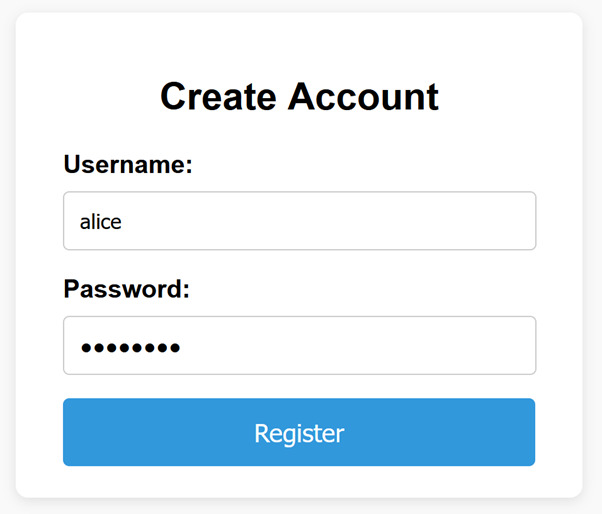
Figure 1: Registration form on the relevant website
Now here’s a feature request: We want to distinguish between customers and administrators, i.e., introduce user roles. The quickest way to do this is to add a role field to the existing User class. The developer makes a minor adjustment to the code: The User data class is given a new role field. Listing 3 shows the corresponding diff.
Listing 3: Change via role feature (diff)
@Entity(name = “users”)
  public class User {
    @Id
    public Long id;
    @Column
    public String username;
    @Column
    public String password;
- // No role field yet (all users were “USER”)
+ @Column
+ public String role = “USER”; // User role (e.g., ‘USER’/“ADMIN”)
  }
At first glance, this seems to work: The registration form on the website remains unchanged. Only in the backend can the application now distinguish between “customer” and “administrator.” But what was overlooked? Because of this change, anyone who knows the API call can now try to register with any role.
Before you continue…
The reading list you'd build – if you had time.
The reads you'd find if you had time
Experts you can actually ask
Deep dives worth your weekend
Past conferences, ready when you are

Exploit: Administrator registration
The attacker, Mallory, senses an opportunity. She immediately sends an API request, manually specifying the role ADMIN (Listing 4).
Listing 4: Attack
POST /api/users
Content-Type: application/json

{
  "username": "mallory",
  "password": "123456",
  "role": "ADMIN"
}
What happens? Our application blindly accepts all fields and creates a user named mallory in the database with the password 123456 and the role ADMIN. There is no check to verify whether the caller is authorized to do so. The backend blindly trusts the request. Mallory can now log in and has full admin privileges.
This is a classic case of mass assignment: the application automatically binds request data to internal objects without excluding security-critical fields. Attackers can thus set hidden or otherwise read-only properties that should not originate from the client—in our case, the admin role. A harmless feature request has turned into a serious security vulnerability: vertical privilege escalation (a regular user gains admin privileges). No wonder BOPLA ranks third in the OWASP API Security Top 10 (Fig. 2).
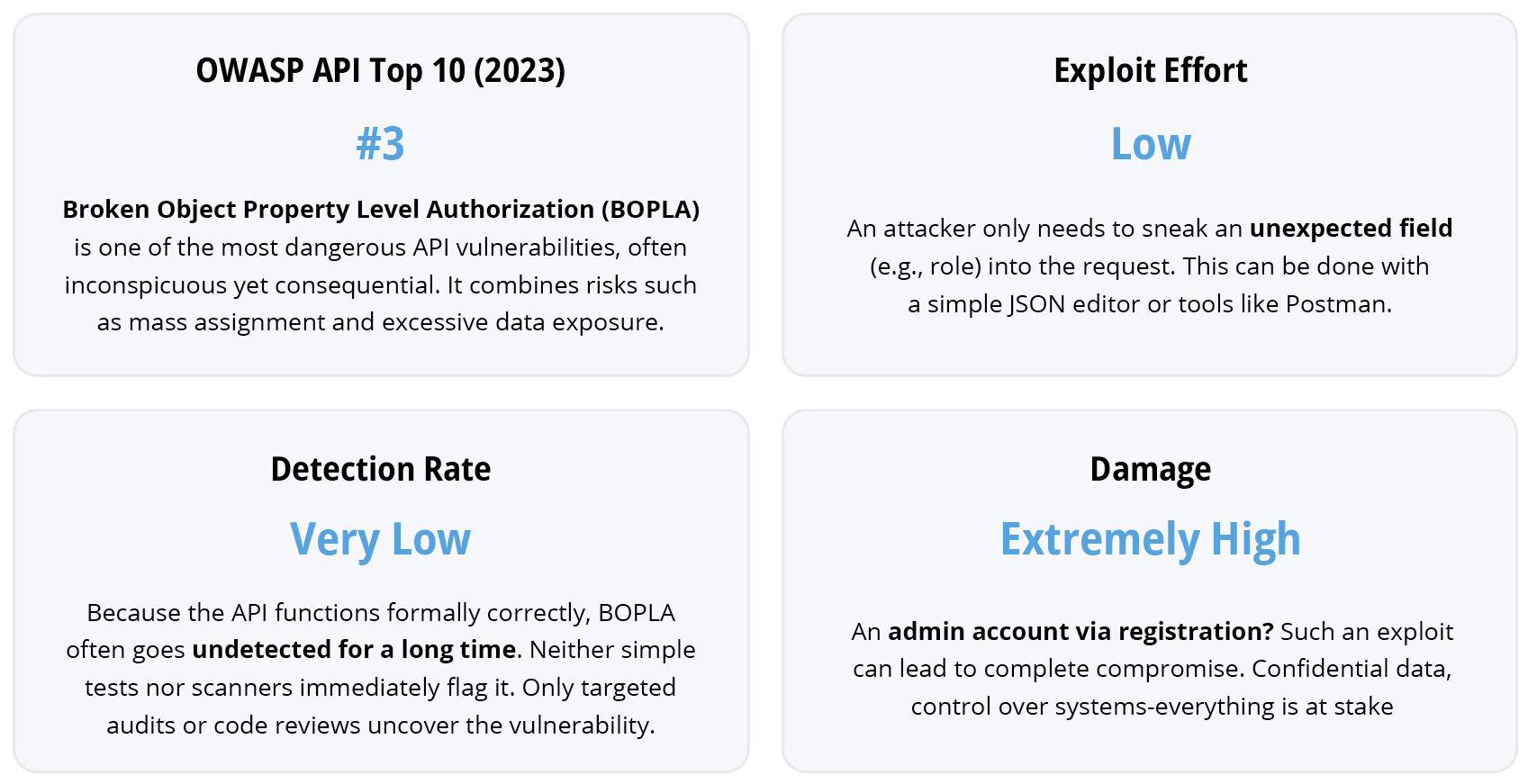
Figure 2: BOPLA Risk in Numbers – One Additional Field, Complete Loss of Rights
Why isn’t that obvious right away?
Such gaps often arise out of convenience or based on false assumptions. The developer might have thought, “Our own front-end app won’t send any admin registrations.” That may be true. But can you guarantee that only your own app will call the API? No. As soon as an API is public, anyone can access it. Mobile apps, web frontends, third-party systems, anything that knows the URL can send requests. Ideally, the API is protected (authentication), but in our case, registration is supposed to be open and available on the website. An attacker can monitor the official app’s network requests (e.g., via browser DevTools or a mobile proxy) and then use their own tools (Postman, cURL) to send the same request with manipulated data. We have absolutely no control over who accesses our HTTP interface. That is the fundamental difference between an internal method call and a public API.
Even automated scanners don’t necessarily detect this, because technically it isn’t an error: the API does allow the role field (whether intentionally or unintentionally). Only targeted abuse tests or security reviews reveal that anyone can promote themselves to admin here.
Frameworks like Spring make data binding very convenient: you can use a domain object directly as @RequestBody. But that’s exactly the problem: without additional precautions, Spring copies all fields from the JSON into the object. Anything that isn’t explicitly ignored or validated ends up there unchecked. As long as the User class didn’t have a role, everything was fine, but now we’ve created a backdoor for ourselves.
Countermeasures: Prevent mass assignment
How can you protect yourself against this? The most important rule is: “Never blindly trust the request data!” Specifically, there are several approaches to preventing mass assignment. It’s best to combine several of the methods we describe below.
Layer separation using DTOs (Data Transfer Objects)
Use a separate DTO for the request instead of directly populating the JPA entity User. For example, use UserRegistrationDto with only username and password, without a role field. The controller then maps this DTO to the database model and assigns the role on the server side. Because the DTO does not allow any role parameter at all, an attacker cannot inject one. This approach, explicitly determining which fields are included, is the safest countermeasure against mass assignment. In many web frameworks, field whitelisting is standard. In Spring/Java, the easiest way to ensure that unwanted fields are ignored is through targeted configuration (@JsonIgnore for JSON APIs, WebDataBinder for forms) or DTOs. The implementation could look like Listing 5 or Listing 6.
Listing 5: Using @JsonIgnore
@Entity(name = "users")
  public class User {
    ...
    public String password;
+     @JsonIgnore
      @Column
    public String role = "USER";
  }
Listing 6: Securing with DTO
@PostMapping(“/api/users”)
public ResponseEntity<?> registerSecure(@Valid @RequestBody UserRegistrationDto req) {
  // req contains only username and password
  User newUser = new User();

newUser.setUsername(req.getUsername());
  newUser.setPassword(passwordEncoder.encode(req.getPassword()));
  newUser.setRole(“USER”); // Assign role permanently
  userRepository.save(newUser);

// Prepare response (never return the password)
  UserResponseDto resp = new UserResponseDto(newUser.getUsername(), newUser.getRole());
  return ResponseEntity.status(HttpStatus.CREATED).body(resp);
}
Here, the password is stored as a hash, and the role ignores any input (always set to USER). The response also contains only selected fields (no password hash). As a result, it doesn’t matter what the client sends. No one other than ourselves will be assigned the Admin role.
Validate and clean up input
In addition, every input should be validated. Bean Validation (e.g., using @NotBlank, @Size, etc.) ensures that fields such as username and password contain valid values. If the client is allowed to specify a role field (e.g., to distinguish between USER and SELLER), the validation must ensure that only permitted role values are accepted. A value such as ADMIN should be explicitly rejected or ignored in this case.
In Spring Boot, unknown fields in a JSON request are not processed by default, but they are also not flagged as errors. This is because the FAIL_ON_UNKNOWN_PROPERTIES setting in the ObjectMapper used is set to false by default. To process unknown fields anyway (which is not recommended in security-critical contexts), you would need to use @JsonAnySetter, for example.
Some JavaScript frameworks, such as Express in combination with celebrate/Joi, also offer options for field validation. There, you can use the stripUnknown option (set to false by default) to specify that unknown fields be automatically removed. A manipulated field such as role: “ADMIN” would thus not appear at all in the processed object.
Note: Silently removing unknown fields has both advantages and disadvantages. While this neutralizes a potential attack, it may also go unnoticed. In security-critical applications, it is therefore more prudent to return an error for such fields or at least log them so that potential attempts at abuse can be traced.
Before you continue…
The reading list you'd build – if you had time.
The reads you'd find if you had time
Experts you can actually ask
Deep dives worth your weekend
Past conferences, ready when you are
Separate privileged actions
When designing your system, consider whether a standard registration endpoint actually needs to be able to create admins or other privileged users. It doesn’t necessarily have to. The assignment of admin rights belongs in a separate, protected endpoint (e.g., /api/admin/users for creating admin users or changing roles). Even if the standard endpoint were manipulable, a submitted role field would have no effect there because it would be ignored. This principle of separate paths drastically reduces the attack surface. Additionally, such admin paths can be specifically secured—for example, by allowing access in the gateway only for internal calls (e.g., blocking external access to /api/admin/*). This ensures that an external attacker cannot use these functions at all, even if they are authenticated. A simple but very effective measure.
Tests and code reviews
Changes to security-related features should be rigorously tested. In this case, a simple negative test would have revealed the error: attempting to register a user with role: “ADMIN” and expecting it to fail. Such tests belong in the test suite, especially when you know that dangerous fields are involved. A code review with a “what if” perspective is also worthwhile. A colleague could have asked: “Can someone abuse this new field?” Unfortunately, security scans (SAST/DAST) do not always reliably detect mass assignment, but some tools (e.g., CodeQL or Fortify) have patterns that trigger an alert when a request object flows unchecked into the persistence layer.
Streamline responses
BOPLA also addresses the issue of unintended data exposure (Excessive Data Exposure). Make sure to return only the fields that are necessary. In our example, we only send the username and role in the response—not the password hash. More generally: When implementing, for example, GET /api/users/{id}, a regular user should never be able to see other users’ confidential fields (e.g., isAdmin, creditCard, permissions, etc.). Such sensitive properties either should not be included in the response at all or must be filtered on the server side (e.g., using @JsonIgnore or specific DTOs for output).
The principle: Anything a client doesn’t absolutely need to know shouldn’t be shown to them in the first place. This also resolves the other half of the BOPLA issue.
Early Detection: OpenAPI Specification and Spectral
Let’s say the developer overlooks security issues during coding. How could the vulnerability have been detected before deployment? One key to this is the API documentation. Professional APIs have an OpenAPI specification that describes which fields a request may contain (OpenAPI is the successor to Swagger).
For example, if we add the dependency org.springdoc:springdoc-openapi-starter-webmvc-ui:2.8.14 to our Spring Boot project and access /v3/api-docs, we’ll already get an OpenAPI definition of our API. In its initial state, it looks something like what’s shown in Listing 7.
Listing 7: OpenAPI in an insecure initial state
openapi: 3.1.0
info:
  title: Webshop Demo API
paths:
  /users:
    post:
      requestBody:
        content:
          application/json:
            schema:
              $ref: '#/components/schemas/User'
        required: true
      responses:
        '200':
          description: OK
          content:
            '*/*':
              schema:
                $ref: '#/components/schemas/User'
components:
  schemas:
    User:
      type: object
      properties:
        id: { type: integer, format: int64 }
        username: { type: string }
        password: { type: string }
Here, only id, username, and password are defined as allowed fields. However, a crucial detail is missing: the additionalProperties property is not set. This means that, by default, the API also accepts additional, undefined fields—a potential gateway for mass assignment.
The setting additionalProperties: false means that no additional fields are allowed. This is an extremely important security requirement. We will therefore update the OpenAPI specification (Listing 8).
Listing 8: Secure by blocking unknown properties
...
type: object
  properties:
    id: { type: integer, format: int64 }
    username: { type: string }
   password: { type: string }
+    additionalProperties: false
Of course, we won’t implement this change manually, since the OpenAPI document was generated. Instead, we use the io.swagger.v3.oas.annotations.media.Schema annotation on the User class:
@Entity(name = "users")
+@Schema(additionalProperties = FALSE)
   public class User {
   ...
So what happens now that the developer has added the role field to the User class, as shown in Listing 3? The generated OpenAPI changes (Listing 9).
Listing 9: Watch out! Dangerous difference
...
properties:
  username: { type: string }
  password: { type: string }
+   role:   { type: string }  # <- new field
    additionalProperties: false    # remains false
Now it’s clear to everyone (at least within the team): The registration request suddenly includes a role field. A security architect would immediately ask why a standard registration should accept a role. This transparency is the first benefit of a clean specification. But even without human oversight, you can take action here: Tools like Spectral (an OpenAPI linter, see [1]) allow you to automatically check compliance with API guidelines.
A proven pattern is to include additionalProperties: false in every object definition in the spec (as shown above). Spectral can be configured (or there are predefined OWASP rules for this) to throw an error if additionalProperties is missing from a schema or set to true. This ensures that developers explicitly define all permitted fields. In our example, this requirement would already have been met; the spec was strict. However, if the developer had failed to update the spec, the discrepancy would be obvious:
- The API code accepts a role field.
- The spec does not allow such a field to be sent (additionalProperties: false without specifying role).
An API gateway with schema validation (more on that in a moment) would block such requests. But even during development, Spectral would have issued a warning if anyone had the idea to set additionalProperties: true (to conveniently allow all fields). So a linter like this enforces the strictness of the interface. It can’t directly “guess” that role is a dangerous field. But it ensures that any deviation must be intentional. The new role property stands out clearly in the diff and can be discussed before it goes live.
GitOps for API Specifications (APIOps)
How do you integrate these ideas into the development process? This is where APIOps comes in. APIOps is an approach similar to GitOps, in which code, API documentation, and gateway configuration are all versioned in Git. In practice, it might look something like this:
- Repo A (our Spring Boot project’s code): The developer modifies the code and, as a result, the generated OpenAPI specification (adding role). A pull request is created. In the CI pipeline, Spectral runs against the spec and ensures that rules are followed (e.g., additionalProperties: false). If everything passes, the changes are merged.
- Repo B (Gateway Configuration): The API gateway (e.g., Membrane or Kong) has its own configuration repository. This is also where the OpenAPI file is stored, which the gateway uses to validate requests. An automated process detects the updated spec in Repo A and creates a pull request to Repo B to deploy the new spec to the gateway.
- Review and Deploy: Before this PR is merged, a security or DevOps engineer should ideally review it, possibly following the dual-review process. During this review, they might notice, for example: “A role field has been added to the registration! Is that intentional?” Ideally, they’ll ask whether abuse is possible, and the PR will be paused until it’s confirmed that the implementation is secure. Only after approval does the change go live, and the gateway accepts the new field.
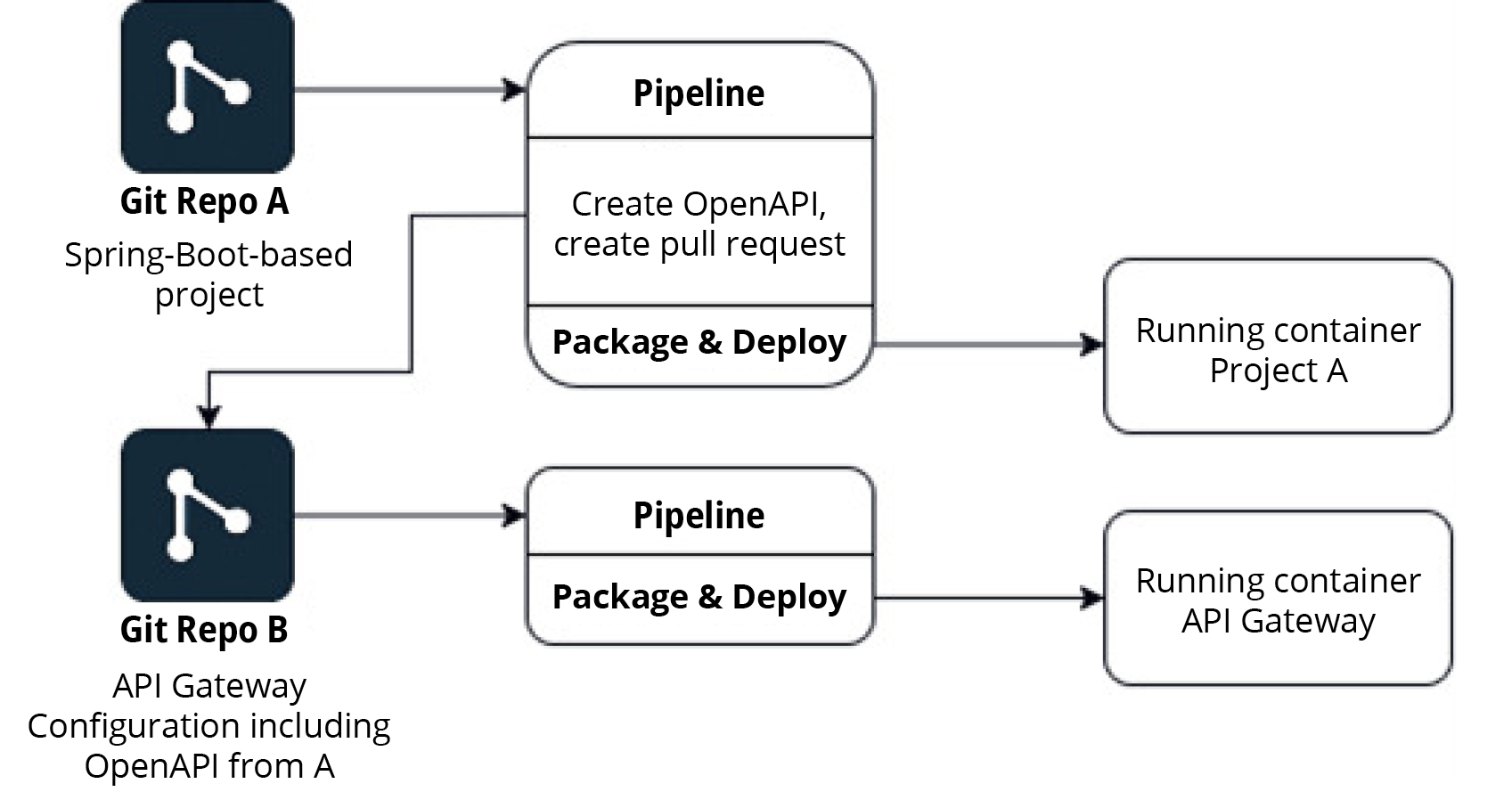
Figure 3: APIOps in our example
This process may sound time-consuming, but it is highly recommended for security-critical APIs. It ensures that security issues are not overlooked but are addressed early in the development lifecycle.
Validation in the API Gateway
One major advantage of taking the OpenAPI specification seriously is that you can use it at runtime. Many API gateways can strictly validate incoming requests against the spec. This means the gateway only allows through what is specified in the contract. In our example, a gateway in its original state would have rejected a request with an unknown role field. If the developer had updated the spec but no one had approved it, the new spec version wouldn’t have made it into the gateway in the first place.
To illustrate this, Listing 10 shows an example of what such a gateway configuration might look like.
Listing 10
<api port="2000">
  <!-- Include OpenAPI specification -->
  <openapi location="openapi.yaml"
           validateRequests="true"
           validateResponses="true"
           validateSecurity="true"
           validationDetails="true"/>

<!-- Logging (optional) -->
  <accessLog/>
  <!-- Define backend service -->
  <target host="localhost" port="8080"/>
</api>
In this Membrane example, an OpenAPI file (openapi.yaml) is loaded and checked against all requests and responses. An unexpected field automatically triggers an error message (“validation failed: property ‘role’ is not allowed,” or similar). A similar approach can also be used with other gateways, such as Kong via a plugin.
Listing 11
_format_version: "2.1"
services:
- name: user-registration
  url: http://user-service:8080
  routes:
  - name: register-route
    paths: [ /api/users ]
    methods: [ POST ]
    plugins:
    - name: request-validator
      config:
        body_schema:
          type: object
          properties:
            username: { type: string }
            password: { type: string }
          additionalProperties: false
Listing 11 shows an excerpt from a declarative Kong configuration (using decK). Here, the Request Validator plugin checks the JSON body: Only username and password are allowed (nothing else). An attacker’s request containing role would be rejected by the gateway with a “400 Bad Request” error before our application even sees it.
Of course, you have to take into account the additional effort involved in such measures. Not every small internal API justifies a fully automated APIOps pipeline or strict gateway filters. But in areas with high security requirements (external APIs, critical data), these mechanisms are worth their weight in gold. They function as multi-layered safeguards: secure development, strict specifications, automated checks, and gatekeepers in front of the application. If an unexpected change does occur, one of the layers will catch the problem.
| Signs | Description/Risk |
|---|---|
| Missing additionalProperties: false | OpenAPI allows additional fields; Risk: Attackers can inject unexpected properties (e.g., role) |
| Direct binding of domain objects | Request data is mapped to JPA entities without a DTO or field whitelist; Risk: Mass assignment |
| generic setters or, for example, BeanUtils.copyProperties() | Copies all fields, including sensitive properties; Risk: Manipulation of security-critical fields |
| PATCH endpoints without field validation | Partial updates accept arbitrary JSON fields; Risk: hidden payload |
| No validation of allowed values | Roles or status fields are inherited without checking for valid values; Risk: Unauthorized access |
| Missing constraints in the database or ORM | DB accepts any values for roles or statuses; Risk: Bypassing code checks |
| unfiltered response serialization | The backend returns complete objects; risk: sensitive properties are exposed |
| No logging for unknown fields | Unexpected fields are silently ignored; risk: attacks go unnoticed |
| Inadequate testing for negative scenarios | The test suite only checks the happy path; risk: attacks such as “role=ADMIN” remain undetected |
Table 1: Typical signs of BOPLA
Key Takeaways for Developers
Developers should keep the following points in mind above all:
- No automatic binding of sensitive fields: Use DTOs or configuration to control which JSON fields are accepted. Domain entities with security-sensitive fields should never be populated directly from the request.
- Whitelist instead of blacklist: Only accept the fields that are actually needed. Ignore everything else or reject it after validation. This is easier than having to block certain fields later on.
- Server-side defaults: Sets important fields in the backend. For example, the role should always be provided by the server during registration (default = USER). This ensures that any role field in the request has no effect.
- Test for abuse: Consider negative test cases: What happens if someone tries to trick the system? A test that ensures that role is ignored would have prevented our bug.
- Think like an attacker: When designing features, always ask yourself, “How could this be exploited?” This perspective helps identify many issues early in the development process.
Key Takeaways for Architects & Security Teams
The following points are particularly important for architects and security teams:
- “Contract-first” thinking: Ensure that your APIs have up-to-date OpenAPI specifications. Use these as a safety net: anything not included in the spec should not be accepted.
- Linters and Policies: Use linters like Spectral to enforce standards. For example, additionalProperties: false should always be set unless it is explicitly necessary. Such policies force developers to design their API thoughtfully and prevent “sloppy” design choices.
- API Gateway as a protective barrier: Leverage the ability of modern gateways to validate requests and responses against the specification. It’s especially important to be strict with publicly accessible APIs. A gateway with schema validation catches many errors or attacks before they can cause damage.
- GitOps/review processes for APIs. Consider running API changes through pull requests and reviews just like code (APIOps). A second party (e.g., a DevSecOps engineer) should keep an eye on changes such as new fields, endpoints, or authorization requirements. The dual-review process reduces the risk of someone accidentally introducing a vulnerability.
- Training and Culture. Raise your developers’ awareness of issues such as mass assignment and data exposure. Those who have internalized the OWASP API Top 10 will automatically build more carefully. Security reviews should not be seen as a chore, but as a mark of quality. This must be reflected in the team culture.
Before you continue…
The reading list you'd build – if you had time.
The reads you'd find if you had time
Experts you can actually ask
Deep dives worth your weekend
Past conferences, ready when you are
Conclusion
The “Register Your Admin” scenario clearly demonstrates how a small code change can lead to a serious security vulnerability. Broken Object Property Level Authorization may be a tongue-twister, but it highlights well-known issues—such as mass assignment and excessive data exposure—that are entirely preventable. This risk can be mitigated through clean separation of layers, strict schemas, and multi-level validations. Developers should never blindly trust inputs but should always process only what is explicitly permitted. Architects and security engineers should ensure that APIs have a clear contract and that deviations from it are detected, whether through tools or processes.
So the spoiler from the introduction turns out to be true: “Register your admin” should not be a legitimate feature. By taking the right steps, we can ensure that admin privileges stay where they belong and aren’t accidentally granted through user registration.
Further Readings
[1] https://stoplight.io/open-source/spectral
🔍 Frequently Asked Questions (FAQ)
1. What is Broken Object Property Level Authorization?
Broken Object Property Level Authorization, or BOPLA, occurs when an API allows users to access or modify object properties they should not control. In the article’s example, a newly added role field lets an attacker register as an administrator by sending role: "ADMIN" in the request body.
2. How can a new API field become a security vulnerability?
A new API field becomes dangerous when the backend blindly accepts client-provided data without checking whether the caller is allowed to set that field. In the article, adding a role field to the User entity allows attackers to manipulate user privileges during registration.
3. What is mass assignment?
Mass assignment happens when an application automatically binds request data to internal objects without restricting which fields may be set. This can let attackers modify hidden, sensitive, or read-only properties such as roles, permissions, account status, or administrative flags.
4. Why is directly binding request bodies to JPA entities risky?
Directly binding a request body to a JPA entity is risky because frameworks such as Spring can copy all JSON fields into the object unless fields are explicitly ignored or validated. When security-sensitive fields are added later, they may unintentionally become writable through the public API.
5. How can developers prevent mass assignment in Spring Boot?
Developers can prevent mass assignment by using dedicated DTOs instead of binding requests directly to domain entities. A registration DTO should contain only allowed fields such as username and password, while sensitive values like role should be assigned on the server side.